Mason for coaches
Fill the slots you are already paying rent on.
Most trainers lose hours to chasing enquiries and rewriting programmes in chat. Mason takes that off your plate so the hour you sell is the hour you coach.
Your coach dashboard. An example week with five students.
| Student | Mon | Tue | Wed | Thu | Fri |
|---|---|---|---|---|---|
| Aisyah RahimIn-studio | ✓ | ✓ | ✓ | ✓ | × |
| Daniel FooIn-studio | ✓ | ✓ | × | ✓ | ✓ |
| Priya KumarOnline | ✓ | × | ✓ | ✓ | × |
| Wei Jian LeeOnline | ✓ | ✓ | ✓ | × | × |
| Farid MusaIn-studio | × | ✓ | ✓ | ✓ | ✓ |
18 of 25 booked sessions attended this week. A tick is attended, a cross is missed.
Less admin. More coaching.
The three things that eat a trainer's week, handled in one place.
New students find you
Once we have checked your credentials, your profile is listed to trainees searching by location, speciality and format. No ad spend.
Fewer no-shows to absorb
Bookings, cancellations and no-shows are kept in one record you can point at.
Coach more people per week
Online students train from their own gym on your programme, so your roster is not capped by studio hours.
Every student's training, on one calendar.
See who trained, what they did and for how long, beside the sessions they have booked with you. Pick a day to read the full log.
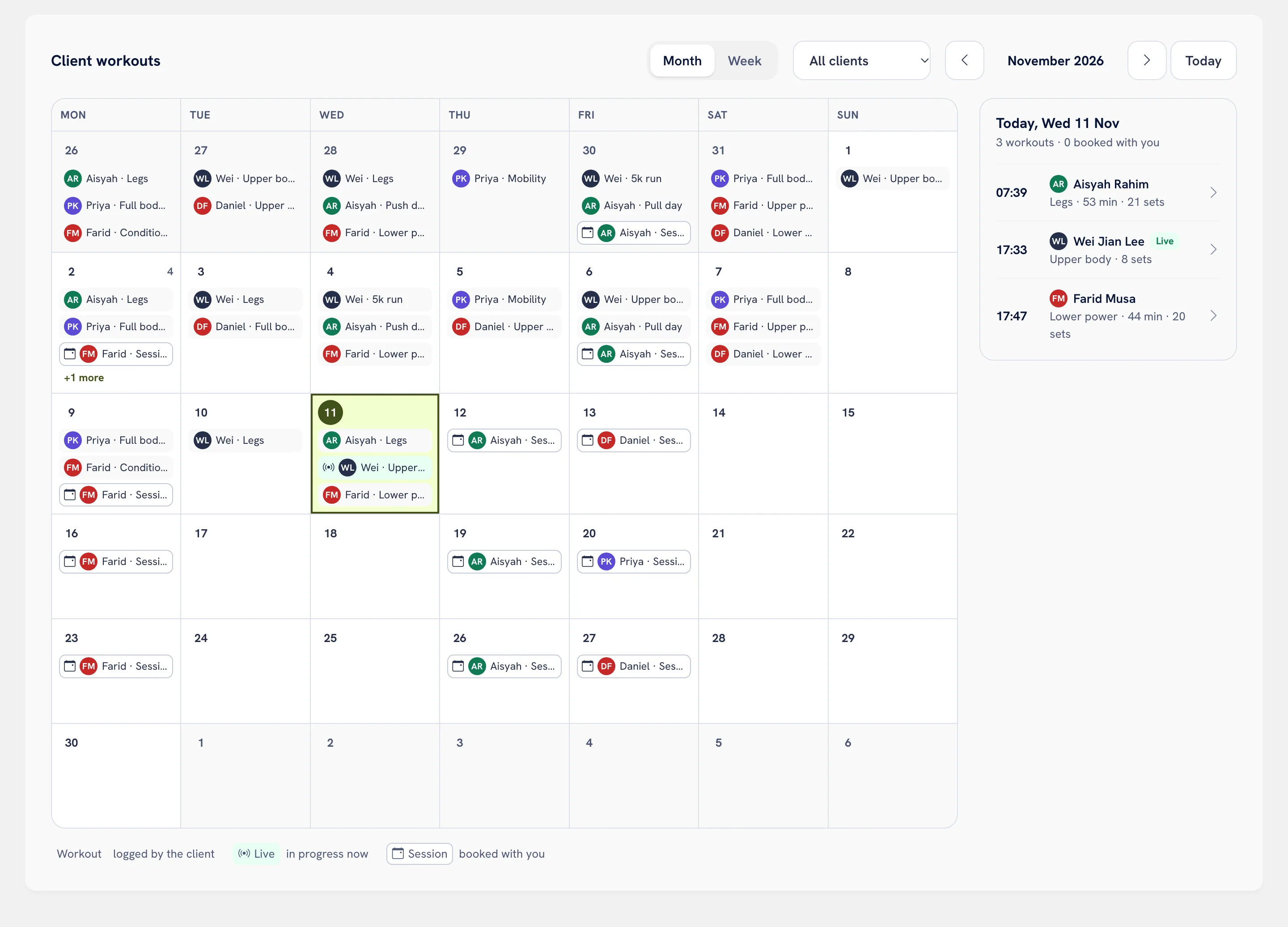
Read the log before you write the next block.
See what was actually lifted last session, then adjust the programme mid-block without a rewrite.
One routine builder, per student.
Write a routine, assign it, and change a single session without touching the rest. It lands in the student's calendar beside the sessions they add themselves.
Set targets and leave notes, when nutrition is shared.
Give a student a calorie and macro target, see their food diary against it, and attach a note to the day. Notes are coaching guidance, not clinical advice.
-
Watch training load, when it's shared.
Heart-rate and volume trends that students choose to share, for programming decisions. Example: Aisyah's average session heart rate is 138 BPM, peak 164, with volume up 9%.
Training insight only. Mason does not assess health or fitness on your behalf.
You see what each student shares. Nothing more.
Students choose, coach by coach and category by category, what reaches your dashboard, and can switch any of it off at any time.
Student data may only be used to deliver coaching, under Malaysia's Personal Data Protection Act 2010.
For example, what Aisyah shares with you:
- Training and sessions Shared
- Nutrition Not shared
- Body metrics Not shared
A person checks every coach.
You upload your certifications and any supporting credentials, and our staff review them by hand. Until that review is done, you are not listed in search and cannot take bookings, so trainees know every coach they find has been checked.
Three steps to your first student.
Set up your coach profile
Certifications, specialities, rates, and whether you take online or in-studio students.
Take on students
New trainees find you in search, and the clients you already train can find and book you in the app.
Assign, mark, adjust
Write each routine, mark attendance after the session, and adjust from their logs.
Free during the soft launch.
Every coach tool, no card needed. We will tell you well before anything changes.
For trainers and studio owners
In a studio, online, or both.
- Listed in coach discovery once verified
- Per-student routine builder
- Attendance and log review
- Training-load overview, when students share it
Your students pay nothing
Members use Mason free during early access, so asking a client to download it is an easy yes.
- iPhone and Android
- Heart rate from Apple Health or Health Connect
- Every set saves on the phone first, signal or not
- They can bring their history from Lyfta, Hevy or Strong
Coach questions
Still unsure? Email hello@masonfitness.app and a human will reply. The coach terms set out the rest.
How are coaches verified?
You upload your certifications and any supporting credentials, and our staff review them by hand. Until that review is done, you are not listed in search and cannot take bookings.
Can I bring the clients I already train?
Yes. Once your profile is verified, they download the free app, find you in coach search and book with you, then choose what to share with you.
Do I need a studio?
No. You can coach in-studio, online, or both. In-studio students book a time slot and you mark attendance on the day. Online students get the same routine and log it at their own gym; you review the logs and adjust the next block.
Exactly what student data can I see?
Only what each student shares with you, in three separate categories. Training and sessions covers their assigned routine, logged sets, session attendance, and session heart-rate summaries such as average and peak BPM. Nutrition covers their food diary. Body metrics covers the measurements they enter. You never see resting data outside sessions or anything from other apps. When a student switches a category off, your access to it ends straight away.
What does PDPA 2010 mean for me?
Each student consents to you separately and can withdraw that consent in the app. You may only use student data to deliver coaching to that student.
What does it cost?
Nothing during the soft launch, with every coach tool included and no card needed. We will tell you well before anything changes.
Your week, run from one dashboard.
Free during the soft launch. Set up your profile in an evening.